Save an AI chat as a readable, checked transcript
To save an AI chat, copy a few messages into a document and check them against the conversation before moving on. Keep the speaker labels and order. Start with one scene you want to keep; long histories are harder to copy without gaps.
Updated by the tempteo editorial team
The writing examples below are invented. They illustrate the advice and are not recorded chat results.
On this page
Choose the part you want to save
Pick a short exchange or scene and note its first and last messages. A transcript keeps the original wording. A recap helps you restart a story, but leaves things out and rewrites others. Save a continuation recap separately if you need both.
Saving a document does not restore the chat inside an app or make a character remember it. The six-message example below is invented to show how to spot a copying mistake.
archive record - keep outside the transcript text
Service and character: Saved on: Scene or range: First message: Last message: Numbered sections and repeated join message: Missing text or omitted media: Status: unchecked / incomplete / complete for this checked range Original checked on:
Copy one message first
Open the chat and a local text document. Select a short, visible message in your browser, copy it and paste it into the document. Compare the wording and punctuation with the original. We checked this step on one visible plain-text message in tempteo using Brave on desktop; other message formats and browsers may behave differently.
If speaker names do not copy, add them separately after checking who said each line. Keep notes outside the message text. Avoid asking an AI or a document editor to clean up the wording of an exact transcript.
Once that works, save small sections from older to newer within your chosen scene. On tempteo, older messages load in pages and only some rows are rendered at once. Select All or Save Page will not reliably preserve the whole history. Scroll or load the next section, then check what is actually visible before copying it.
Number your sections in the notes. Copy the last message of one section again at the start of the next, so you can check where they join. A message you saw earlier may no longer be loaded.
Check where two sections join
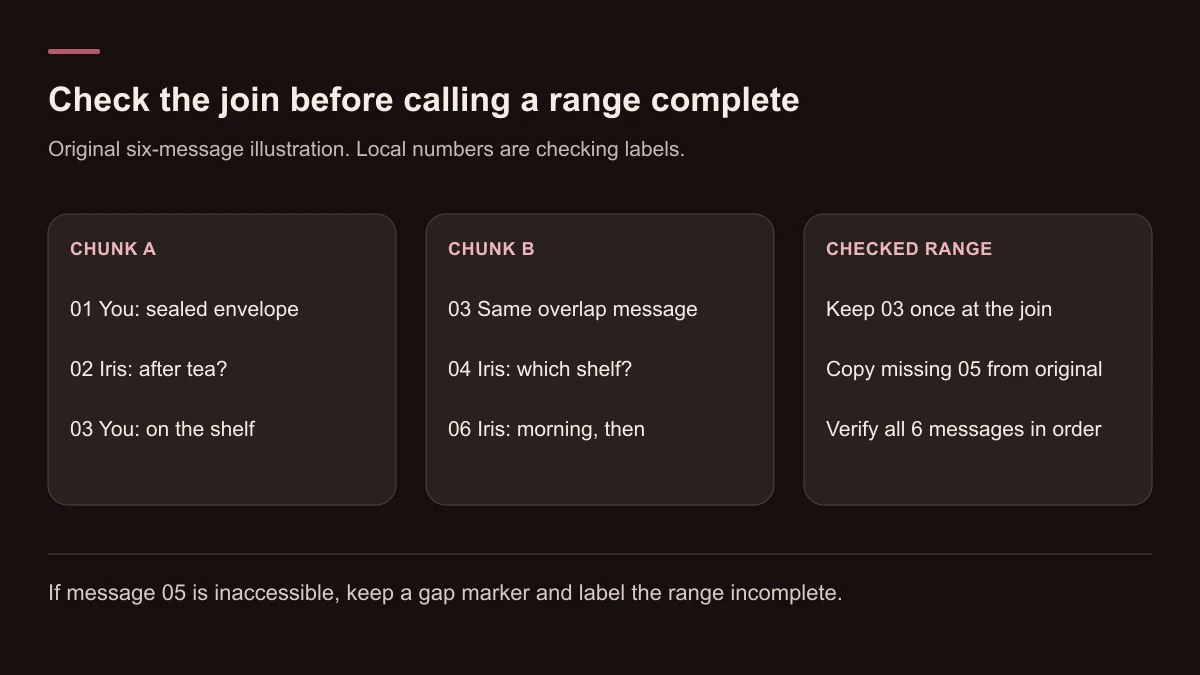
In this example, section A contains messages 01 to 03. Section B starts with the same 03, then includes 04 and 06. The numbers are our checking notes, not app message IDs.
The repeated 03 gives you a clear join. Comparing the next lines with the original reveals a missing message, 05. Copy that message from the original if it is still accessible. If it is missing there too, leave a gap note.
Example: chunk A, local labels 01-03
01 You: The blue envelope is still sealed. 02 Iris: Shall we open it after tea? 03 You: I'll leave it on the shelf.
Example: chunk B, overlap 03 and missing 05
03 You: I'll leave it on the shelf. 04 Iris: Which shelf? 06 Iris: Morning, then. I'll put the kettle on.
Example: join check
Join: message 03 appears in both sections. Keep it once. Gap: the original has a You message between 04 and 06. Message 05: You: The one by the window. We can open it in the morning. Copy 05 from the original and check the wording. If inaccessible, leave a gap note.
Keep the original wording and order
After copying message 05 and removing the extra copy of 03 at the join, the saved exchange reads as follows.
This is complete for the six-message range we checked. Earlier scenes and any media need separate checks. Remove only confirmed copying duplicates: a person or character might really say the same sentence twice.
Example: corrected result, checked range only
You: The blue envelope is still sealed. Iris: Shall we open it after tea? You: I'll leave it on the shelf. Iris: Which shelf? You: The one by the window. We can open it in the morning. Iris: Morning, then. I'll put the kettle on.
Mark gaps and omitted media
Put a clear note where text is inaccessible, for example: 'Archive note: a message after the shelf question could not be saved.' Leave that range marked incomplete. An AI-written replacement would change the record.
Label omitted images, voice messages or videos at their position. Keep an accessible caption word for word if it belongs to the chat, but do not replace the media with a description and call it an exact copy. Avoid putting private media links in a document you plan to share.
This method can preserve only what you can still read and check. It cannot recover deleted messages. To carry selected story facts into later replies, use the memory guide.
Save a private original
Name the file with the service, character and scene so you can find it later. Reopen it and check the first and last messages. Check your document app's sharing and sync settings before treating the file as private.
Make a separate copy for sharing. Remove names, contact details, account identifiers and private links you do not want to share, then check comments, metadata and screenshots. Label that version 'redacted' and keep your checked original unchanged.
- Compare the saved messages and speaker order with the original.
- Check joins for copied duplicates and missing lines.
- Mark omitted media and inaccessible messages.
- Use 'complete for this checked range' only after checking that entire range.
Check for a documented export
Character.AI's support page describes an account-data export through profile settings on web and in its app. That route is specific to Character.AI. This guide uses manual copying on tempteo and does not assume an Export or Restore feature.
If your platform offers an export, open the result and inspect whether it includes the range and format you need. If manual copying does not preserve readable messages, record what you saved and what you could not verify.

