Stop companion messages on Telegram without deleting your account
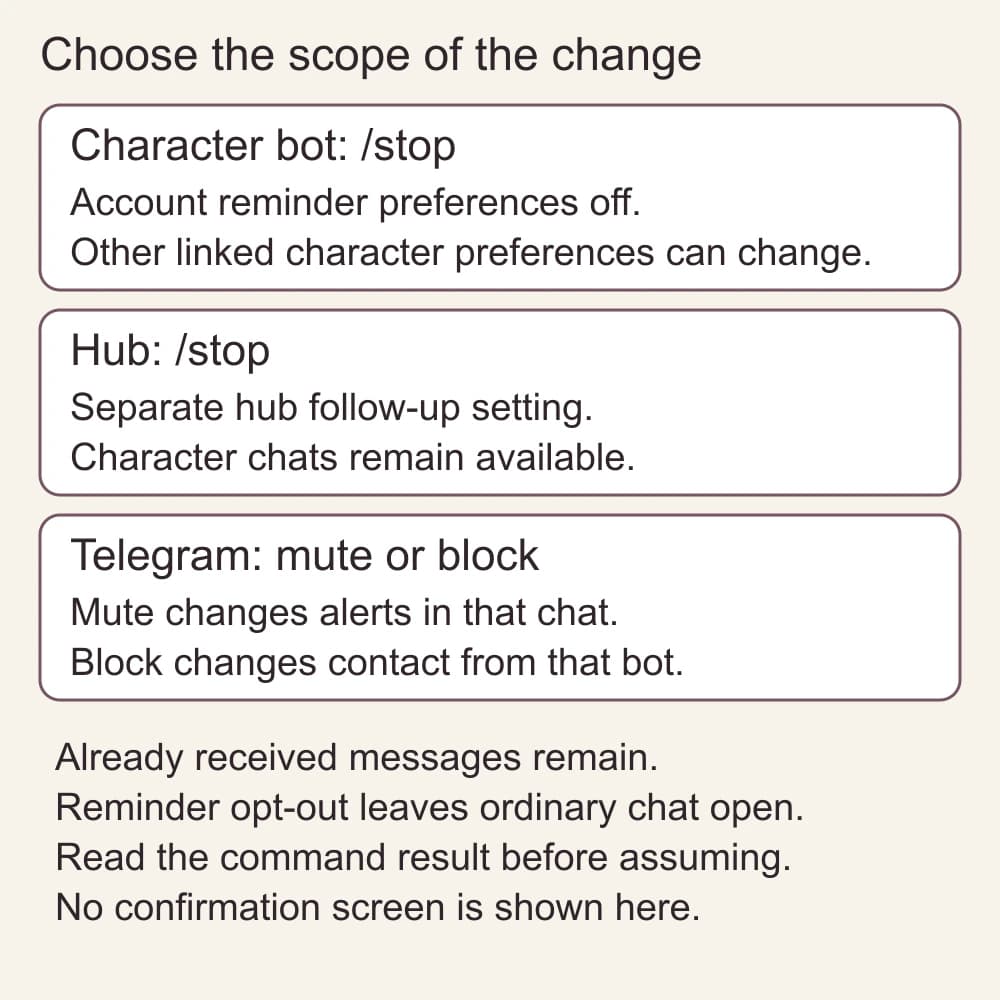
For a tempteo character bot, /stop turns off saved conversation-reminder preferences for the linked account. In the tempteo hub, /stop stops the hub's own follow-ups. These are separate settings. You can still choose to write to a character. For silent alerts or no contact from one particular bot, use Telegram's mute or block controls.
Updated by the tempteo editorial team
The writing examples below are invented. They illustrate the advice and are not recorded chat results.
On this page
- Choose the control for the interruption
- A reminder pause that leaves ordinary chat open
- Check which tempteo bot you are stopping
- When mute or block is the better choice
- Chatting again does not require reminders
- If an unexpected message still arrives
- Keep setup, reminders and limits separate
- Common questions
Choose the control for the interruption
Start with the smallest change that matches what you want. A quiet afternoon, no unsolicited check-ins and no contact from one bot are not the same request.
- I want messages to remain in the chat without alerts: mute that chat in Telegram.
- I want tempteo's conversation reminders off, but I still want to write to my companion: send /stop or /reminders off.
- I want that bot not to contact me through Telegram: use Telegram's block control for that bot.
- I want to erase account data: that is a separate, deliberate account-management request, not a way to diagnose notifications.
If you are unsure whether the interruption is a notification or the message itself, open the chat and look at what arrived. Muting an alert will not stop new messages from appearing in that chat.
A reminder pause that leaves ordinary chat open
Here is an illustrative decision, not an observed bot conversation. You use a dedicated tempteo character bot. You want to choose when to start a conversation, and you do not want to delete the existing chat.
First, keep the bot unblocked. Send /stop in that tempteo bot's chat. The command's purpose is to store an opt-out from conversation reminders. It is not a command to end every ordinary conversation.
Read the command reply before assuming the change took effect. If you get an error or the command is not recognized, record that result instead of repeatedly trying unrelated commands.
When you want to chat again, write a normal message, for example: "Let's continue the lighthouse scene. The lamp is still unlit; ask me what I want to check first." You do not need to turn reminders back on just to send that message.
Your three choices in this example
Before: the bot is unblocked; you want fewer unsolicited check-ins. Change: send /stop; read the result. Do not delete the chat. Later: send an ordinary scene message when you choose. Keep reminders off while writing ordinary messages. Re-enabling is a separate account-preference decision.
The intended result is a saved reminder opt-out while ordinary, user-initiated chat remains available. This is a source-based instruction, not a guarantee that every queued or already-sending message will be recalled.
This keeps two decisions separate: whether a reminder should start a conversation and whether you want to write a message now. If you just need quiet while reading, Telegram mute can be used without changing the reminder preference.
Check which tempteo bot you are stopping
In a dedicated tempteo character bot, /stop and /reminders off disable stored conversation-reminder preferences for the linked account. This can affect the reminder preferences of other character bots connected to that same account; it is broader than muting one Telegram chat.
The tempteo hub handles /stop separately. It cancels the hub's own follow-ups and leaves your character chats available. Stopping the hub is not the same as changing a character bot's reminder preferences.
The current personal-offer selection also respects account opt-outs. Messages already delivered remain in the chat, and a message selected or sending before the setting changed may still arrive. Check which bot sent it and when, then contact support if the result does not match your choice.
A command acknowledgment tells you which preference was saved. It does not recall messages from the chat or prove that every sender and queue has been checked.
/stop does not delete your account, wipe a conversation or stop a reply to a normal message you send. Do not use an account-deletion command as a trial fix for unwanted check-ins.
- Reminder preference: disabled by /stop or /reminders off.
- Ordinary chat: not disabled by the reminder command.
- Messages already received: not erased by the command.
- Notification sound: use Telegram's notification controls.
- Contact from a particular bot: use Telegram's block control if that is your intention.
When mute or block is the better choice
Mute is the right fit when you want messages available but do not want their alerts. Open that chat's notification controls and choose the mute setting you intend. Menu names and available durations vary between Telegram apps, so follow the controls shown on your device rather than looking for one universal button label.
Block is a broader choice for contact from a particular bot. Telegram's official FAQ explains that a bot can be stopped or blocked through its app controls. Those controls belong to Telegram; /stop is a command interpreted by the provider. Sending /stop to an unrelated bot does not establish what that provider will do.
If you use several bots, do not assume muting or blocking one mutes or blocks the others. Make the choice in the chat whose notifications or contact you want to change. Do not stop a bot you still need merely because another chat sent an alert.
For app-specific help, see the Telegram FAQ. For tempteo's reminder behavior, use the source and limitations below. Keep both layers separate when describing a problem.
Chatting again does not require reminders
Leave reminders off if you want to choose when to write. You can send ordinary messages without changing the reminder preference.
If you later want to re-enable character-bot reminders, read /reminders help in that character bot for its current help. The supported on command includes a valid timezone, for example /reminders on Europe/Berlin. Choose your own timezone deliberately. Saving that preference does not establish a delivery timetable or undo a Telegram mute or block.
The hub's follow-up setting is separate. Do not send an assumed resume command or infer that a command for a character bot also changes the hub.
If an unexpected message still arrives
Do not begin by deleting the account. First decide whether the message was a reply to something you sent, an unsolicited check-in, a personal offer, or a message from another bot. Those distinctions give support something useful to investigate.
Write a small record for yourself: the bot name, which command or Telegram control you used, whether it showed a result, and whether the unwanted message arrived before or after that change. Keep your Telegram account details and the private conversation out of public reports.
If the message is already there, muting will only change alerts going forward. If you want no further contact from that bot, Telegram block is the relevant contact control. If you want normal chat but no check-ins, leave the reminder preference off and report the unexpected sender through tempteo support.
The tempteo-specific behavior described here is based on the current command and opt-out implementation, not a live bot test. It does not verify every device, campaign or in-flight queue. Support should investigate the actual message rather than promise a universal purge.
Keep setup, reminders and limits separate
The Telegram setup page covers starting a chat; it is not the same task as controlling contact after setup. If you were looking for access or credit information, read the current plan terms and credits page. Changing notification settings is not a way to reset an allowance.
Common questions
Can I still chat after /stop?
In tempteo's current implementation, /stop disables conversation reminders, not ordinary chat. You can still send a normal message. A separate Telegram block or an account-access problem is a different matter.
Will /stop remove messages already in my chat?
No. It changes tempteo's reminder preference. It does not erase delivered messages or guarantee that a message already in flight will be recalled.
Is /stop a universal Telegram command?
No. It is interpreted by the bot provider. Use Telegram's own mute or block controls for their separate notification or contact effects, and check each provider's command behavior.
Do I need to turn reminders on before writing again?
No. Write an ordinary message when you want to chat. Check separately whether you have blocked the bot or have an account-access problem.

